Integrate Next.js with Headless CMS in 4 Simple Steps
TL;DR
Learn how to effectively integrate Next.js with various Headless CMS options for scalable and fast websites.
Introduction
Currently, Headless CMS stands out for allowing the separation between content management and visual presentation. This model, which uses APIs to deliver content, results in faster and more scalable websites.
Next.js is one of the most widely used frameworks with React and is particularly well-suited for integration with Headless CMS. Its features, such as server-side rendering (SSR), static site generation (SSG), and API routes, make it the ideal choice for platforms like Strapi, Contentful, Sanity, and WordPress in headless mode.
In this article, we'll cover:
- Definition and functionality of a Headless CMS;
- Why Next.js is the ideal choice for this integration;
- A step-by-step guide for the integration;
- The best Headless CMS options for Next.js.
Let's start by understanding what a Headless CMS is.
What is a Headless CMS?
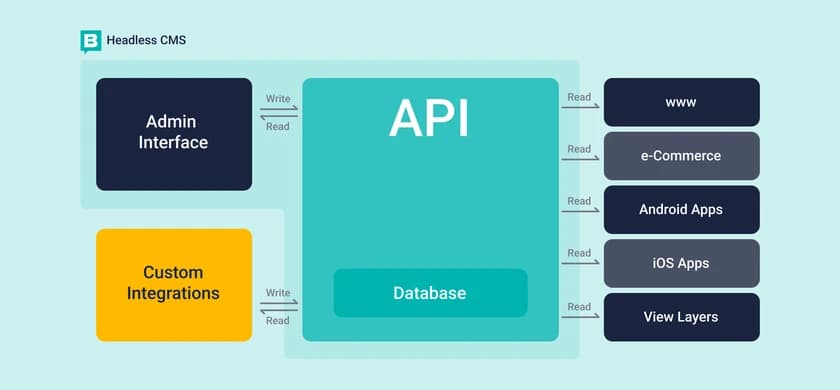
A Headless CMS is a content management system that decouples data creation and storage from visual presentation. Practically, it allows users to create and manage content, like text and images, without specifying how that content will be displayed.
To visualize, imagine a library: a traditional CMS like WordPress acts as a librarian that organizes the display of books, while a Headless CMS merely stores the books, leaving the display to the developer's discretion.
Thus, a Headless CMS focuses on content storage, facilitating its delivery across multiple platforms.
How does a Headless CMS work?
- Content is created and stored in the Headless CMS;
- The CMS provides a REST or GraphQL API to access this content;
- Next.js consumes the API and displays the content dynamically.
This decoupled architecture provides a more flexible and scalable content management.
Why is Next.js perfect for integrations with Headless CMS?
Next.js offers various rendering options, API routes, and optimization features, making it the ideal choice for Headless CMS platforms.
Server-Side Rendering (SSR)
SSR allows Next.js to fetch content from the Headless CMS when requested, which is especially useful for sites needing real-time updates.
export async function getServerSideProps() {
  const res = await fetch("https://cms-api.com/posts");
  const posts = await res.json();

  return { props: { posts } };
}
Static Site Generation (SSG)
SSG enables pre-rendering of pages during site build, reducing server load and improving SEO.
export async function getStaticProps() {
  const res = await fetch("https://cms-api.com/posts");
  const posts = await res.json();

  return { props: { posts } };
}
API Routes
Next.js allows you to create API routes, enabling custom logic, such as handling webhooks.
export default function handler(req, res) {
  res.status(200).json({ message: "Hello from Next.js API!" });
}
Incremental Static Regeneration (ISR)
ISR allows updating static pages without rebuilding the entire site, making it effective for dynamic content.
export async function getStaticProps() {
  const res = await fetch("https://cms-api.com/posts");
  const posts = await res.json();

  return { props: { posts }, revalidate: 60 }; // Updates every 60 seconds
}
Image Optimization
Next.js automatically optimizes images stored in the Headless CMS, improving performance and Google PageSpeed rankings.
import Image from "next/image";
Step-by-Step Guide: Integrating a Headless CMS with Next.js
To integrate, follow the steps below:
Step 1: Choose a Headless CMS
Here are some popular options:
- Strapi – Open-source and self-hosted CMS;
- Contentful – API-based CMS with cloud hosting;
- Sanity – Real-time collaborative editing;
- WordPress (Headless) – Famous but in decoupled mode.
Step 2: Fetch Data from the CMS API
Use getStaticProps or getServerSideProps according to your update needs.
export async function getStaticProps() {
  const res = await fetch("https://cms-api.com/posts");
  const posts = await res.json();

  return { props: { posts } };
}
Step 3: Display the Content on Next.js Pages
Use the map method to present the data.
export default function Blog({ posts }) {
  return (

      {posts.map((post) => (
        {post.title}
      ))}

  );
}
Step 4: Deploy on Vercel for Better Performance
Next.js is optimized for Vercel, ensuring efficient deployment.
vercel deploy
Best Headless CMS Options for Next.js
1. Strapi
Website: https://strapi.io/
Best for: Self-hosting and customization.
- Open-source and self-hosted;
- REST and GraphQL APIs.
2. Contentful
Website: https://www.contentful.com/
Best for: Businesses and cloud hosting.
- Flexible content structure;
- Complete management and scalability.
3. Sanity
Website: https://www.sanity.io/
Best for: Real-time collaboration.
- Support for real-time updates;
- Ideal for content teams.
4. WordPress
Website: https://wordpress.org/
Best for: Familiarity in headless mode.
- Easy for non-technical editors;
- Uses the WordPress REST API.
Conclusion
Next.js becomes a robust option for integrating a Headless CMS due to its diverse capabilities:
- Flexible data fetching options (SSR, SSG, ISR);
- Superior performance for SEO and user experience;
- API routes and custom logic;
- Automatic image optimization;
- Facilitated deployments with Vercel.
For projects requiring scalability and performance, the combination of Next.js with a Headless CMS is an effective approach to developing contemporary web applications.
Content selected and edited with AI assistance. Original sources referenced above.